
Program the light.
Run the show.
LUMEN is a DMX lighting controller for Windows. Build scenes, effects and palettes, watch every beam on a 2D stage, then play the show live from the PC, a touch screen or your phone. And see it all in 3D with LUMEN Visualiser.
- Art-Net & sACN
- USB DMX interfaces
- Effects with BPM sync
- 2D stage visualiser
- About 650 fixture profiles
- Phone & tablet remote
- Touch wing
- Tempo sync
- 3D visualiser
 LUMEN DMX syncs its tempo with Ableton Link
Version 0.15.1 · Windows 10 and 11 (64-bit)
Play the show, one button at a time.
Every scene becomes a button on the live board. Mix them, flash them and keep the whole rig in time with the music.
- Toggle and flash buttons, organised in zones.
- Grand, speed and group masters to ride the whole show or just the pars.
- Tap tempo and BPM Sync to lock chases and effects to the beat.
- Blackout, release all and hold buttons, plus MIDI learn for your controller.
- All lamps on and Reset all, and Audio BPM to follow the music.
Scenes, effects and palettes in minutes.
Select fixtures, pick a colour or a position, and record. LUMEN keeps programming fast, so you spend the time on the look, not the channels.
Scenes with steps
Steps with fade and hold times, crossfades between them, and loop, bounce or random playback.
Effects
Chases, rainbows, circles, figure-8s and sweeps, in time with the BPM.
Palettes
Colour sets, position presets and beam presets, one click away. Record new ones with Merge or Replace. With nothing selected, a palette goes on every fixture it has something for.
Named groups
Name groups such as Left beams or BG washes, select them in one click, and let effects follow a group.
Colour made easy
A colour wheel with brightness and saturation, quick swatches, and the dimmer opened for you when you pick a colour.
Undo, redo and autosave
Try ideas freely. Every change can be undone, and your show is saved as you work.
Override cues
Make a cue Override and what it sets wins over every other cue, palette and effect on stage, until you release it.
Named zones
Name your zones and pick them from big tiles, with the cues already in each.
Effect palettes
Save any effect as a palette, to put in another cue or run live from the wing, and play any effect backwards.
Find the right look at a glance.
Give every scene and palette its own colour and icon, so the drummer’s look or the singer’s spot is easy to spot mid-show.
- Ten colours, or any colour: on scenes and on colour, position and beam palettes.
- 104 icons: with a search and sets for light and stage, beam positions, shapes and movement, selections, symbols and weather.
- Musicians & performers: drums, percussion, keyboards, guitar and bass, singer, choir, brass, sax, DJ, dancers and more.
- Everywhere you play: on the Live buttons, in the lists and on the touch wing’s buttons.
- Set them from the touch wing too: Look sets them for the scene you’re programming or a palette, or for a button in the Live grid’s Edit mode.
Draw the move. Play it on the beat.
Build effects from keys on a timeline, then keep them as shapes you can use on any fixtures.
- Lanes of keys for intensity, colour, position, beam or any channel. Keys come from levels, colours, palettes or the programmer, each with a curve to the next: linear, ease, smooth or step.
- Record with + Key, drag keys on a beat grid, scrub and play. Loop, bounce, ping-pong, once or random, in beats or seconds.
- Spread it across the rig with order, wings, blocks, groups, mirrored pan and an amount that fans from the first fixture to the last.
- An effect library: save any keyframe effect as a reusable shape, apply it with + From library, and import or export it.
- 22 built-in effects, from Chase, Bump on the beat, Sparkle and Police to Fire, Ballyhoo, Stadium and Disco.
Spread one move across the whole rig.
Faders, Full, the colour tools and the position pad can fan their values across the selection.
- Fan from the centre, the first or the last fixture, along a curve, in the selection’s order or the stage’s, in blocks, wings or groups, or shuffled.
- Colour gradients from A to B in RGB, hue or rainbow, per fixture or per LED cell.
- Pan and tilt fans around the point the pad aims at.
- Mirror pan per fixture or for the left half of the stage, with stage scaling so the outer fixtures move most.
Lamps, resets and finding every fixture.
The jobs that come before the show, done safely and quickly.
- Lamp on, lamp off and resets, found in each fixture’s profile, held for as long as the fixture needs and staggered between fixtures, with progress and Cancel.
- From anywhere: Program → Machine, a fixture’s right-click menu, the Lamps buttons in Live, or the phone remote.
- Highlight: the selected fixtures at full in open white, on the output only, so programming and the show stay untouched.
- One by one: step through fixtures with a counter, and Highlight follows. Locate sends a home look to the programmer.
Your rig’s home look. The exact value.
A home look for every fixture, and faders for the exact values in between.
- Custom Locate: save each fixture’s own home look (position, zoom, focus, colour and more) with Save as Locate. Locate then brings the rig back to it from the PC, MIDI, the phone or the wing.
- Default Locate: goes back to the built-in look at any time.
- Fine-tune faders: in Beam & presets, set the exact value within a colour slot, a gobo rotation speed or a strobe type, from slow to fast, or across the whole channel for focus, zoom, iris and frost.
- 16-bit: where the fixture has it.
The tempo follows the music.
Feed in the music from a line input, a USB sound card or a microphone, and BPM-synced effects stay on the beat. Nothing is recorded.
- Beat light and confidence bar, with sensitivity, Lock, ×2 and ÷2.
- Offset in milliseconds so the lights lead or lag the beat you hear.
- Holds the last tempo through breaks; a tapped or typed BPM still wins.
- MIDI-mappable, with the BPM and an Audio button on the phone remote.
Everyone on the same beat.
LUMEN locks to the tempo of your DJ and music apps during a live performance, and when it detects the BPM from the music itself, it keeps video software and devices on the same beat.
- Tempo sync with Ableton Link: Resolume, MadMapper, Pangolin BEYOND, Ableton Live, Cubase, Pro Tools, Remixlive, Traktor, Rekordbox, Serato DJ, VirtualDJ and other apps with Ableton Link on, on the same network, take LUMEN DMX’s tempo and bar. With Follow on, the tempo is shared: a change in any of them changes LUMEN’s too, and Tap and Sync in LUMEN move them all.
- OSC to Resolume: Resolume’s BPM follows LUMEN’s, and its bar starts with LUMEN’s.
- Network MIDI: LUMEN is a network MIDI session that a Mac or a PC finds by name, with MIDI clock and Start on the bar.
- MIDI clock to a MIDI port: a USB MIDI interface or a virtual port.
- Sync and Send early: Sync sets beat 1 everywhere, and an app that joins later starts on the next bar. Send up to half a second early for a screen that shows the beat late.
More about Ableton Link at ableton.com. Ableton, Live and Link are trademarks of Ableton AG. Other names are trademarks of their respective owners.
See every beam before the doors open.
The 2D stage shows your rig as it plays: colours, dimmers and moving-head beams, live.
- Drag fixtures into place, then rotate and flip them to match the real rig.
- Arrange a selection in a line, an arc, a grid or a circle.
- Mirror pan and Mirror left half right on the toolbar.
- Program without the rig: check looks and effects on the stage view, anywhere.
Find the profile. Patch it. Done.
Search about 650 real fixtures from the Open Fixture Library and more than 10,000 fixture types from GDTF Share, right inside LUMEN, bring in QLC+ and GDTF profiles, and keep a fixture library that every show shares.
- Search by maker and device, and filter by category and features, for example "LED par with dimmer, shutter and RGBWA+UV".
- Add to your library or patch straight away. Download the library once, then it works offline.
- A channel map for each universe shows free channels and overlaps at a glance.
- Auto-address, duplicate and groups, with pan and tilt invert and mirrored pan for each moving head.
- Import MVR rigs straight into the show, change the type of patched fixtures and keep their programming, and put new fixtures straight into a group.
GDTF Share, right in the finder.
Sign in with your own GDTF Share account and search more than 10,000 fixture types, many uploaded by their manufacturers, next to the built-in profiles, your library and the Open Fixture Library.
- Add to library or Patch: LUMEN downloads the fixture’s latest GDTF revision and brings in the mode you pick.
- Search offline: LUMEN keeps the list on the PC, so searching works without internet.
- The same feature filters: dimmer, RGBW, pan/tilt, gobo, zoom and more. Until a fixture is added, its features are guessed from its name and description, marked ≈.
- Your password kept safe: with Remember, Windows keeps it encrypted.
Share fixtures with other lighting software.
Import and export fixture profiles in QLC+ (.qxf) and GDTF (.gdtf) formats, alongside the built-in Open Fixture Library browser.
- Import QLC+ fixtures and GDTF fixture types, as well as Open Fixture Library and LUMEN profiles. Every mode becomes a profile, with 16-bit channels, named ranges, colour and gobo wheel slots, and the pixel heads of LED bars.
- Export any profile as a LUMEN profile (.json), a QLC+ fixture (.qxf) or a GDTF fixture type (.gdtf).
Bring in a whole rig from MVR.
Import MVR… in Patch brings an MVR file (My Virtual Rig) straight into LUMEN, as a new show or into the one that is open.
- Every fixture type at a glance, with its DMX mode and its GDTF file. Pick another mode, use a .gdtf file or one of your own profiles; a mode too big for its addresses shows in red.
- Fixtures keep their universe and address, take their place on the stage plan and get a group per type. One that runs into a fixture you already have moves to the next free address.
- The same placement in 3D: LUMEN Visualiser following the show puts every fixture exactly where the MVR has it.
Your phone is a lighting desk.
Open the remote on any phone or tablet on the same Wi-Fi: scan the QR code and you are in.
- QR-code connect, with an optional PIN to keep the remote private.
- Run scenes live: grand master, blackout, tap, sync and release, lamps on and reset all, the BPM and an Audio button, from anywhere in the room.
- Program from the stage: select fixtures, set the dimmer, aim with the pan and tilt pad, apply palettes, record new cues and find units with Highlight and Locate.
Your rig and your players, from one phone.
LUMEN Player Remote opens LUMEN DMX’s phone remote and touch wing, and finds and runs every LUMEN Player on the network, from one Android phone.
- Finds them by itself: the players and LUMEN DMX on the phone’s Wi-Fi, or by address. Each shows its show, what’s playing and its mode.
- Each player’s own controller: opens in the app, with every control. A PIN is asked once, then kept on the phone, encrypted.
- Quick actions: Release all, Blackout, playlist Start, Next and Stop, and autonomous or piloted mode, without opening the player’s page.
- Scan to join: scan a player’s QR code and the phone joins the player’s own Wi-Fi by itself, and keeps its internet on mobile data.
- Send a show: a LUMEN show or player file, picked on the phone or shared from WhatsApp, Drive or email. The player keeps its own outputs, and Undo puts the old show back.
- LUMEN DMX too: open LUMEN DMX’s phone remote and its touch wing from the same list, or from its QR code.
LUMEN Player Remote 0.6 · Android 10 or later · On request
A lighting desk on any touch screen.
Program and play the show from a touch screen: full screen on a second monitor of the show PC, in a browser on any PC or tablet on the network, or in the LUMEN Wing app.
- Fixture tiles that show their live colour, groups, and a keypad: “1 thru 4 + 9”.
- Encoders for every attribute, wheels, gobos and macros included, and a Channels page with every channel.
- Colour wheel and swatches, a position pad, presets and palettes.
- Fan and mirror: from the centre, the first or the last fixture, with wings, blocks, order and curve, and mirror pan with pan and tilt fans.
- A 6×4 button grid with up to 8 pages, saved in the show. It is made from your scenes, palettes, groups and actions until you edit it.
- Scene faders with Go and Flash, and Grand, Speed and group masters, paged with big buttons.
- Tap, Sync, Release, Release all, Clear All, Fog and Blackout always at hand.
- The FX sheet: every effect playing, faster or slower, bigger or smaller, with another spread or direction, or backwards, without changing the show. Save it into the cue or as a palette.
- Effect cards with their own encoders: add a chase, a colour effect, a circle, a wave or a keyframe effect, or one of the 22 built-in effects from the library.
- A full-screen keyframe editor: tap the beat grid to add a key, drag it to move it, scrub along the ruler, and set each key’s level, colour, palette and curve.
The LUMEN Wing app for a separate touch PC.
A full-screen app for a touch PC or an all-in-one on the same network.
- Finds every LUMEN on the network by itself, with its show, PC and version, and whether it has a PIN. Tap one to open its wing: no setup, no addresses to type.
- Always the right version: the wing comes from the LUMEN it connects to.
- An open remote protocol lets your own controllers drive LUMEN too, PIN-protected: selection, encoders, colour, scenes, masters, the button grid, effects and keyframes.
Your own buttons and faders.
Build your own control panel on a small touch screen beside the show PC, or on a screen on another PC, landscape or portrait.
- Buttons: cues (toggle, flash, go, release), palettes, groups, effects and actions such as Blackout, Release all, Tap and Fog.
- Faders: a cue’s level with its Go or Flash, a group master, Grand or Speed, with several fingers at once.
- Edit on the panel: tap a free square to add an item, drag to move it, drag its corner to size it, and give it a label and a colour. Up to 8 pages.
- A separate app: it finds every LUMEN on the network, goes back to the last one by itself, runs full screen and can start with Windows. It also opens in a browser.
- Saved in the show: a show without panels gets a landscape and a portrait panel made from it.
Several PCs, one show.
Other LUMEN DMX PCs join the show this PC has open and play it with it, as on a multi-console desk: a cue started on any PC plays on all of them.
- One engine: the host computes the light for every PC and streams each universe to them, so nothing drifts.
- Each PC’s own outputs: a guest sends any universe out of its own Art-Net, sACN or USB DMX outputs.
- From a guest: cues, faders, masters, Tap and the BPM, Sync, Blackout, Fog, Release all, lamps and palettes.
- If the host is lost: the guest’s own show comes back after a few seconds, and its outputs hold the last look until Rejoin or Release outputs.
Connects to the rig you already have.
Send DMX over the network or through a USB interface, and keep an eye on every channel.
MIDI learn
Map scenes and buttons to your MIDI controller in a couple of clicks.
Shows that travel
Each show carries a copy of the profiles it uses, so it opens on another PC as it is.
Made for Windows
Windows 10 and 11 (64-bit), with a dark interface that is easy on the eyes in a dark room. The user manual is built in: open it from the menu, even offline.
See your show in 3D.
The 3D stage visualiser for LUMEN and for any lighting console: live beams, gobos and moving heads, real GDTF fixtures and MVR rigs, video screens, people and rigging, with present, NDI® output and 4K export. With LUMEN DMX it follows your show, selects fixtures both ways and aims moving heads with a click.
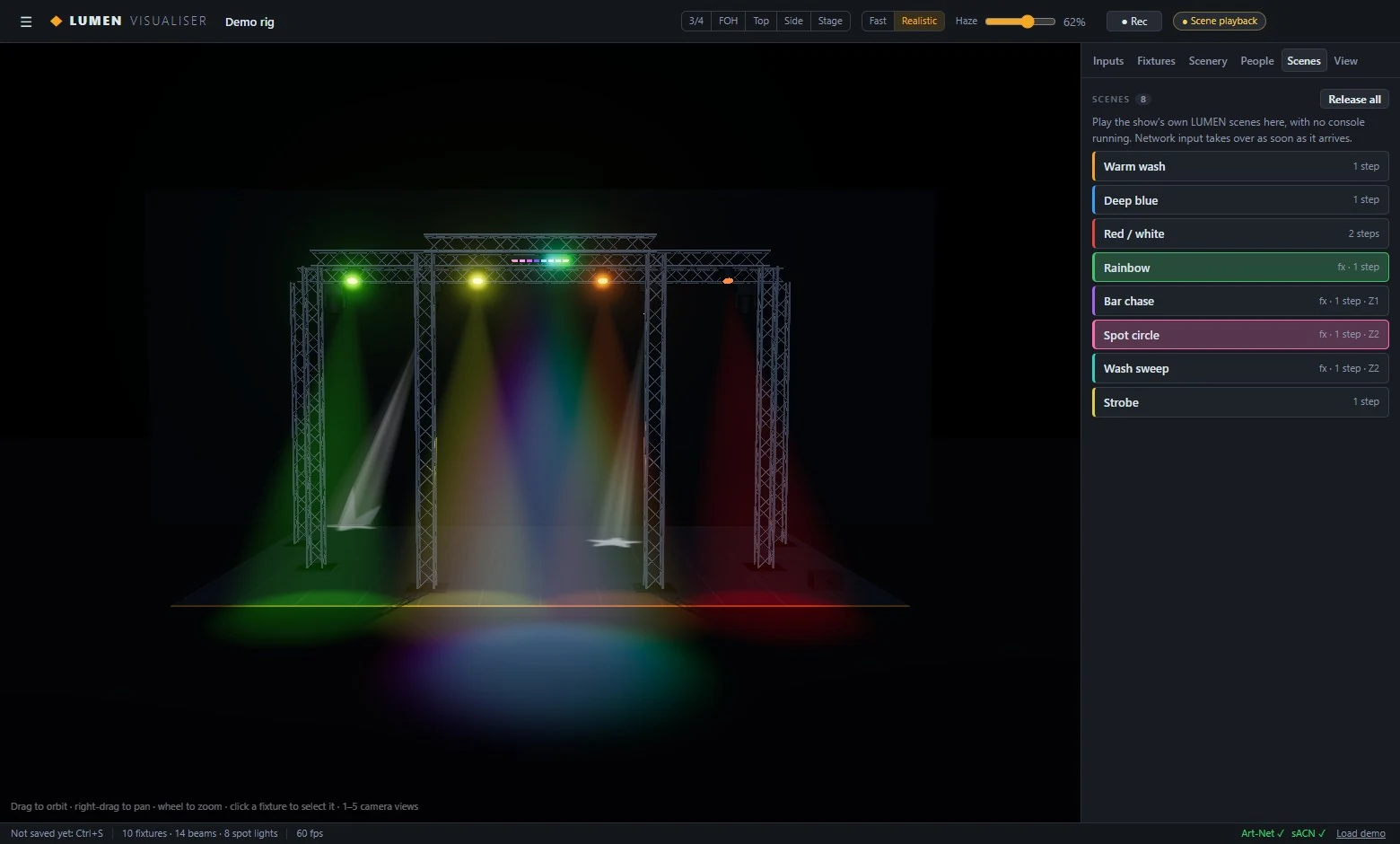
LUMEN Visualiser 0.10.3 · Windows 10 and 11 (64-bit) · On request
NDI® is a registered trademark of Vizrt NDI AB.
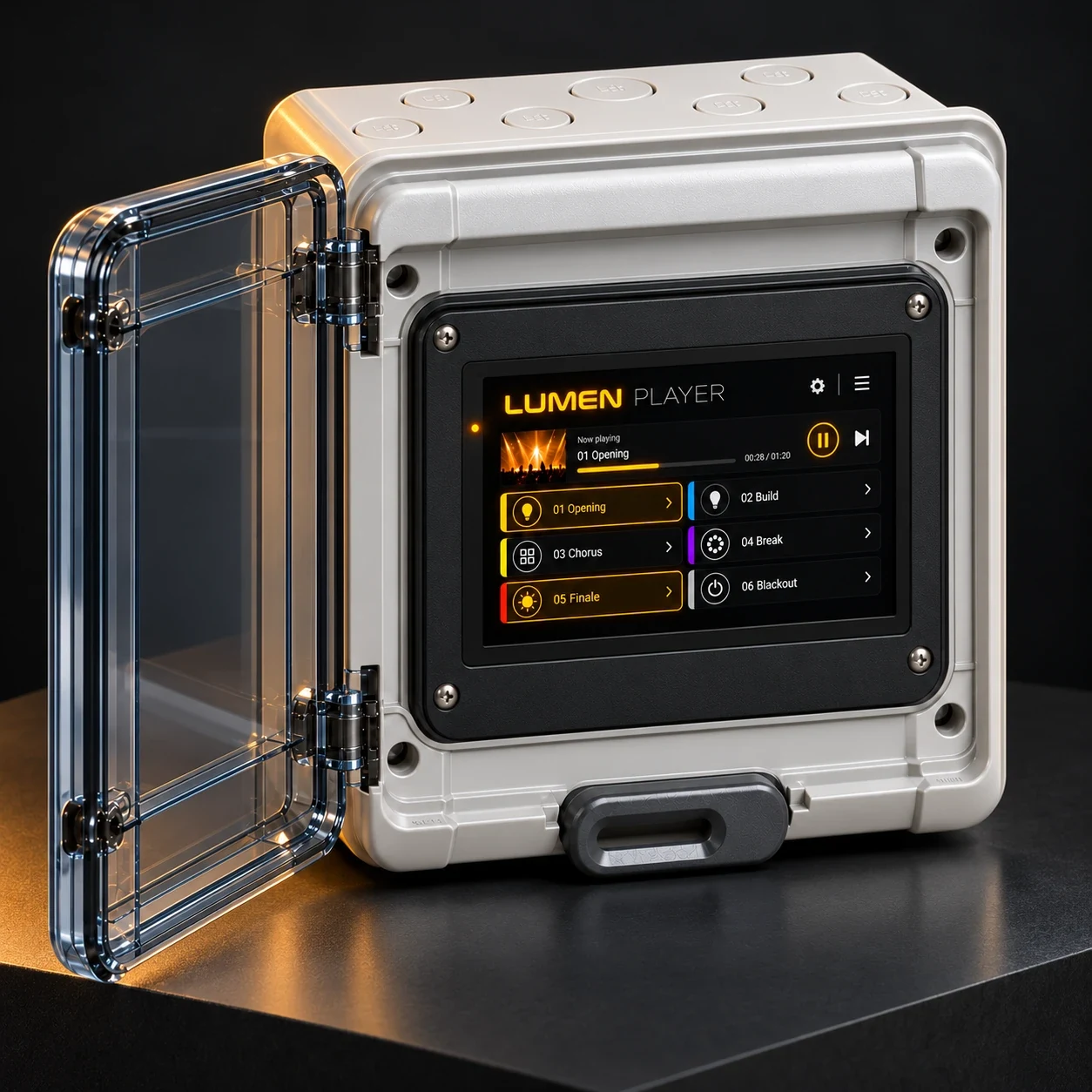
Your show, on autopilot.
Hand your LUMEN DMX show to LUMEN Player and it plays on its own, with no computer and no operator: cues, music and playlists, every day at the times you set.
- Timelines: cues and their fades on one time axis, with the music under them.
- Playlists and a schedule: on chosen days, from a start time to a time off.
- A player box or a Windows app, controlled from any phone, even with no network.
- Art-Net, sACN and USB DMX, or a DMX node for a lighting console.
LUMEN Player 0.4.4 · Player box, or Windows 10 and 11 (64-bit) · On request
Bring LUMEN to your next show.
LUMEN, LUMEN Visualiser and LUMEN Player are available on request. Tell us about your rig and we will get you set up, or read the user manual first.
