See the show.
Before the doors open.
LUMEN Visualiser shows your lighting rig live in 3D: beams, gobos, moving heads, LED walls and people. It works with any lighting console over Art-Net or sACN, runs on its own without one, and does even more with LUMEN DMX.
- Any console: Art-Net & sACN
- Real GDTF fixtures
- MVR import & export
- Video screens & mapping
- Present & NDI® output
- 4K stills & MP4 export
Version 0.10.3 · Windows 10 and 11 (64-bit) · On request
Your rig, live in 3D.
Every fixture plays in real time: beams through haze, colours and gobo patterns, moving heads that move like the real ones, LED pixels, strobes and fog.
- Works with any lighting console over Art-Net or sACN, and appears on the network as a visualiser. It also takes DMX from a USB DMX interface.
- Runs alongside LUMEN on the same PC, or on a laptop linked to LUMEN on another PC.
- No console needed: it plays the show’s scenes itself, or a DMX recording you made earlier.
- Camera views from front of house, top, side and the stage, plus your own saved views and camera moves.
- Projects that keep your rig and scenery together, and autosave as you work.
Plot your rig with real fixtures.
Drop in the GDTF files that manufacturers publish for their fixtures, and see their actual models, beams and gobos.
- The real thing: each fixture comes in with its 3D model, pan and tilt, beam angle, brightness and zoom, and its real gobo images, projected in the beams and on the stage.
- Add fixtures fast by type and mode, quantity and DMX address (the next free one is filled in), on a truss or on the floor.
- Send to LUMEN: hand the plot to LUMEN for programming.
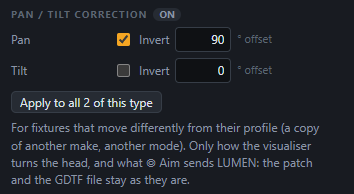
- Pan / tilt correction: when a fixture on the rig moves differently from its profile, for example a copy of another make or a different mode, correct it in the visualiser alone. Invert pan or tilt, or add an offset in degrees, on one head or on every fixture of that type at once. The patch and the GDTF file stay as they are, and aiming with a click takes the correction into account, so a beam aimed in 3D lands in the same place on the real rig.
Bring your rig in as MVR, and send it back.
Open a whole rig in the open MVR format. Tested with MVR files from Vectorworks, Capture, grandMA3 and Depence, and works with any program that exports MVR.
- Every fixture arrives as planned: its GDTF type and mode, its patch, and its exact position and angle.
- Placeholder fixture files handled: each type is marked as a full GDTF file, a placeholder or missing; pick the maker’s .gdtf before import, and anything without channel data gets a generic type that fits its addresses.
- The same placement in both apps: a rig imported into LUMEN DMX from MVR keeps its exact 3D placement here.
- Truss, set and venue come in as one 3D model.
- Export writes the rig back as MVR.
Build the stage in 3D.
Click a truss, a fixture or a set piece and drag its handles to move or rotate it.
- Your own truss runs, with their length, height and depth.
- Moving a truss carries its fixtures along with it.
- Move many at once: select several fixtures, a LUMEN group or LUMEN’s selection, and move or turn them together.
- Rotation, Tilt and Roll on all three axes, and Face the audience in one click for blinders and front-truss strobes.
- Hang a fixture on a truss: pick the truss in the fixture’s settings or drop it under a truss in 3D. It then moves with the truss and counts in its rigging loads.
- Saved camera views and video: keep your favourite angles and record the 3D view.
Bring in your stage and set.
Import the stage, truss, set pieces or the whole venue as 3D models exported from most 3D design tools.
- Units are detected, so models arrive at the right size.
- A raised deck height makes the beams pool on top of the stage, where they belong.
- Your own stage takes over: import a whole stage or venue and the built-in demo stage switches off by itself.
Fast
Smooth on a laptop, even with more than 100 fixtures.
Realistic
Drifting haze, and the brightest beams become real spotlights that project gobos and cast shadows on the stage and the rig.
See the light on people, not just on the floor.
Add performers and the audience, and the video screens behind them, so you see the whole picture.
- Performers and audience: standing, arms up, a singer or a guitarist, and blocks of audience, lit by every beam, gobos and all, in Fast quality too.
- Video screens: LED walls and projection screens that show video, images, or pixels from a console’s pixel mapper over DMX.
- Screens light the stage: the people in front of a screen catch its light.
Map your LED screens onto any part of the video feed.
A second window, made for a second monitor, shows the video feed live with each screen’s region on it.
- Any feed: video files, cameras or capture cards, and NDI® sources on the network.
- Each screen its own region, for example a 126 × 786 column from the far left of a 1920 × 1080 feed and a 512 × 512 square from its centre.
- LED modules: build a screen from modules (across × down, pixels and millimetres per module). That sets its size on stage and its resolution, and it maps pixel for pixel, like an LED processor.
- NDI® input: NDI sources on the network go straight onto the screens.
- Same screens, different video: a feed can switch to another video file, camera or NDI® source and every screen keeps its region. The Scenes tab lists each feed’s videos and one click plays another; a whole mapping can also move to another feed.
- Delete a screen right from the mapping window; its feed keeps running for the other screens.
NDI® is a registered trademark of Vizrt NDI AB.
Light that behaves like the real thing.
Every beam lights the set and the truss, and in Realistic quality whatever stands in a beam stops it.
- The whole set is lit: imported stage, set and venue models and the truss catch every beam, in Fast and in Realistic.
- Real shadows: in Realistic, performers, set pieces and truss cast shadows through the haze.
- More real spotlights: 8 on a typical graphics card and up to 12.
- More from GDTF files: a second gobo wheel and an animation wheel with their real images, framing shutters with four moving blades, and lasers drawn as thin lines in their own colour, brighter in haze.
- Big rigs stay fluid: a 146-fixture festival rig went from 2 to about 50 frames a second on the same PC, and the picture stays sharp on slower PCs, with an option to keep full resolution always.
- Fast with real stages and screens: a detailed stage model with 12 LED screens on one video went from about 20 to 60 frames a second, and videos on the screens play more smoothly. Imported models are optimised automatically when they load and look exactly the same.
Gobos on everything they hit.
Gobos, framing shutters and colour land on the performers, the audience, an imported stage or set and the truss, in Fast and in Realistic.
- Focus and frost: gobos are sharp where the beam lands and softer away from it, in the haze too. The focus channel moves the sharp distance, and frost blurs the image.
- Wheels between slots: half-way between two slots you see two half gobos, or a beam split between two colours. A spinning wheel shows its slots passing through, and colour wheels also colour fixtures that mix CMY.
- Prisms: copies of the beam in a row or on a ring, as the GDTF file describes them.
- Animation and effects wheels: sweep across the beam, and the beam shaper turns it into an oval, image and all.
- IES beams: load the manufacturer’s IES photometric file for a fixture type, and its beam takes the measured hot spot, falloff and shape.
- Big rigs: fixtures of one type are drawn together: 400 moving heads with gobos, all moving, run at about 60 frames a second in Fast.
Cold sparks and CO2 jets, live in 3D.
Special effects play from any console’s DMX, right next to the lights, so the whole look is in the plot.
- Cold spark machines: sparks fly as high as the height channel says and fall back round the machine, with a warm glow on the floor and light on the people and set near them. Hung on a truss pointing down, they make a spark curtain.
- CO2 jets: a white plume that shoots up and billows out, lit by the beams crossing it, and by the jet’s own LEDs, coloured from DMX, on jets that have them.
- Add them in one click: + Sparks / CO2 places spark machines or CO2 jets along the front of the stage, on the floor in front or on a truss. Fixture files named spark, CO2 or cryo are recognised, and any other type can be made one.
- Set up per type: spark height or jet reach, the channel and value that fire it, the height channel and the clearance. Test fire shows them with no console.
- Zones to keep clear: a red zone round each effect in 3D, never in the output or exports, and a dashed circle on the stage plot with each type’s clearance in the legend. Each can be hidden: the View tab in 3D, a toggle in the stage plot dialog, and a type set to 0 m has none.
The visualiser shows what the console’s DMX asks for. Firing effects safely stays the console’s and the operator’s job.
Show the design, full screen.
Take the 3D view to the client, the crew or the video team. Nothing you present or output shows selection outlines or handles.
- Present: the 3D view alone, full screen on the display you choose. Space plays the camera move, the arrows step through the moves, Esc comes back.
- Output window: the clean 3D view on a projector, an LED wall or a client screen, while you keep working on the other display.
- NDI® output: the 3D view as an NDI source for a video mixer or a streaming PC, in 720p or 1080p at 25 to 60 frames a second, from the view’s camera or a camera move playing on its own.
NDI® is a registered trademark of Vizrt NDI AB.
Fly through the rig. Export it in 4K.
Build camera moves from your favourite views, then export stills and videos for the design pack, a poster or the client’s presentation.
- Camera moves: fly-throughs from view to view, built from keys you set by orbiting. Each key holds, then the camera travels on: smooth, gliding through, linear or a cut. Loop, scrub, and start the DMX recording with the move.
- 4K stills: PNG images up to 3840 × 2160, sharper than the screen.
- MP4 videos from 720p to 4K at 25 to 60 frames a second, drawn frame by frame, so nothing is dropped however heavy the rig. The light comes from the show’s scenes or a DMX recording, and the screens’ videos stay in step.
Record the show. Print the plot.
Tools for the programming session and for the crew.
- DMX recorder: record every universe as it comes in, then play it back with no console: play and pause, loop, scrub forwards and backwards, then back to live. Takes are saved in the project.
- Stage plot and patch list as a PDF (A3 or A4): the plan from above with every fixture’s number and DMX address, a legend of the fixture types, the 3D view, and the patch list in DMX order.
- System load at a glance: CPU, RAM, and graphics card load and temperature, next to the frame rate.
- User manual built in: open it from the menu or with F1.
See the load on every point.
An optional module, off until you need it: build the rig with real truss and hoists, and see the weight and power it adds up to.
- Truss types: box 30 or 40 cm, triangle or ladder, on ground-support towers or hung on chain hoists (1 to 12 per truss).
- Loads on every motor and tower, from the truss and its fixtures, with each truss’s weight and the rig’s total. Points over the limit show in red, with the loads over the points in 3D.
- Weight and power per fixture from their GDTF files, or typical values you can correct.
- Power per circuit in watts and amps, with circuits over their size in red.
- Rigging plot in the stage plot PDF: the plan with every hanging point’s load, plus tables of points, trusses and power circuits.
- Your choice: hide the load labels in 3D and keep the numbers, or switch the module off and the rigging tab, loads and PDF pages go away.
Weights and loads are estimates for a qualified rigger to check, not a structural calculation.
From your LUMEN show to a 3D rig.
Open a LUMEN show: the patch and the 2D stage plan become a 3D rig, with truss and towers built for you.
- Follows LUMEN live. Patch in LUMEN, see it in 3D: fixtures you add, move or delete appear, move or disappear within about a second, and the truss follows. Scenery and views stay as you set them.
- Play LUMEN’s own scenes in the visualiser, or let the demo cycle through them. Network input takes over as soon as a console starts sending.
- Fine-tune every fixture: position, height and aim, hung from the truss or standing on the floor.
- Works with LUMEN DMX: fans, mirrored pan, machine functions and keyframe effects play in 3D.
- Show clients the look on a laptop, before the rig is even hung.
Select in one, see it in the other.
On the same PC or across the network, the visualiser links to LUMEN: selections follow both ways, and you aim moving heads with a click in 3D.
- Selection both ways: fixtures selected in LUMEN are outlined in 3D, and a fixture clicked in 3D is selected in LUMEN. It uses LUMEN’s phone remote, which has to be on in LUMEN.
- Aim with a click: click a spot on the stage, the set or a performer, and LUMEN’s selected moving heads point there, each with its own pan and tilt worked out on its 3D model.
- Record the look: one click saves it as a position palette in LUMEN.
- Labels in 3D: fixture names and DMX addresses next to every fixture.
- LUMEN on another PC: run LUMEN on a touch screen or a small PC at the desk, and the visualiser on a laptop. Find LUMEN on the network lists every LUMEN with its phone remote on, with its show and a lock when it has a PIN: pick one and type its PIN.
- Everything works over the network: selection both ways, aiming, position palettes and LUMEN’s groups. The link reconnects by itself.
- Follow the show: the patch and stage plan follow the show open in LUMEN, a couple of seconds after each change.
- Your placement stays: fixtures you place in 3D stay where you put them, even when they move on LUMEN’s plan. Place from LUMEN’s plan puts them back in line with it when you want.
Program in LUMEN DMX. See it in 3D.
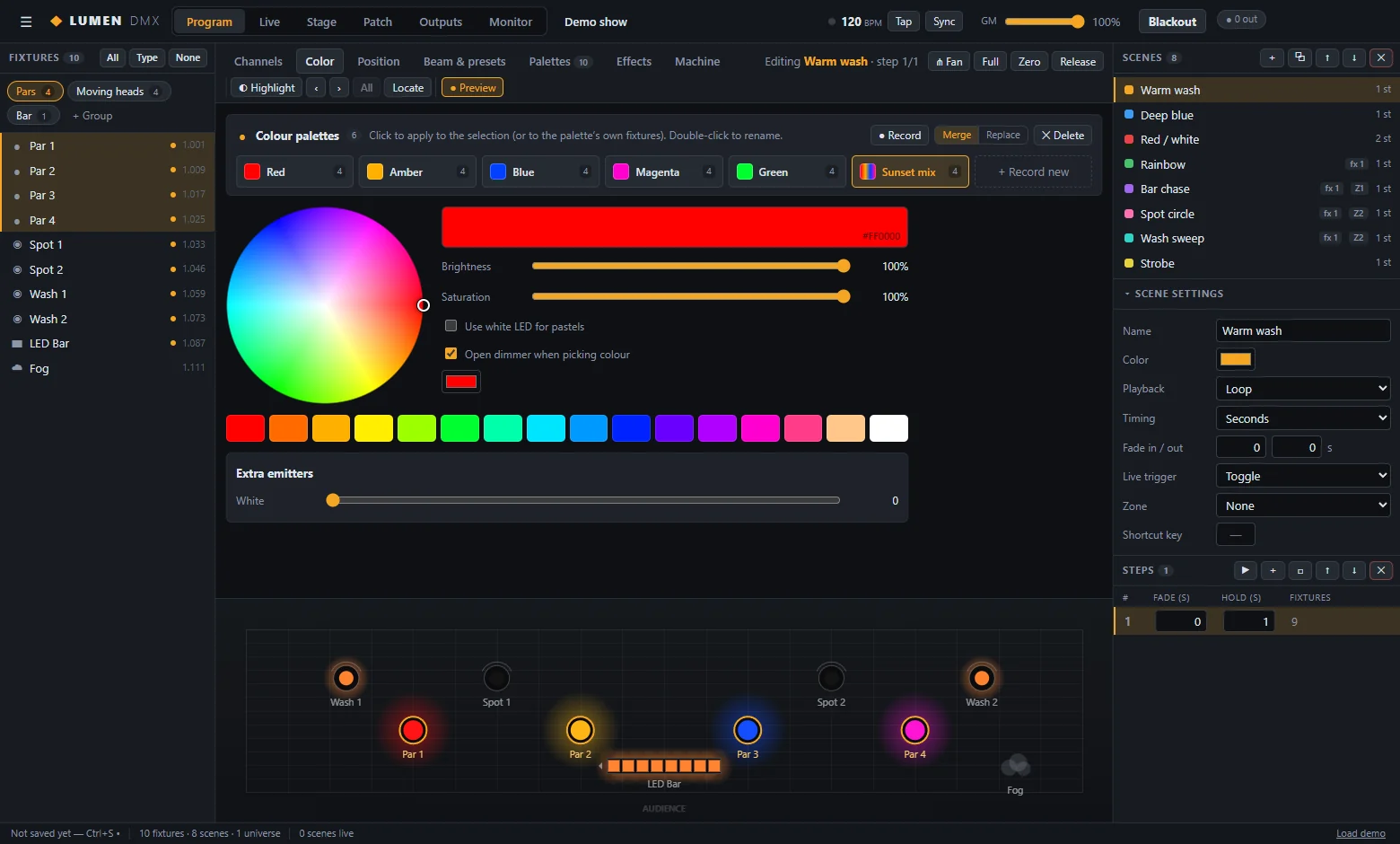
LUMEN DMX is the lighting controller: scenes, effects, palettes, a 2D stage, a phone remote and a touch wing. With it, the visualiser follows the show, selects fixtures both ways and aims moving heads with a click.
See your next show in 3D.
LUMEN Visualiser is available on request. Tell us about your rig and your console, and we will get you set up.
